
Generating Audio Files with Google AI Studio
TLDR
- Google AI Studio is suitable for creating audio content that requires a natural tone and emotional delivery, rather than verbatim reading of rigorous technical documents.
- To ensure data privacy, be sure to "Set up billing" in AI Studio to prevent input data from being used for model training.
- It is recommended to keep the Temperature parameter at the default value of
1; setting it too low may cause abnormal audio output or robotic sounds. - When processing mixed Chinese and English content, it is recommended to add a half-width space between them to improve pronunciation accuracy.
- If you encounter the
Failed to generate content: user has exceeded quotaerror, it means the daily free quota has been reached; please try again later.
Tool Positioning and Privacy Recommendations
When to encounter this issue: When you need to choose the right Google AI tool and have high requirements for data privacy.
- Gemini: Positioned as a personal digital assistant, suitable for daily tasks, with integration for Google Drive and email services.
- AI Studio: Positioned as a developer workstation, providing professional parameter control and advanced features like "Generate speech."
- Privacy Protection: Gemini uses conversation data to train models by default; AI Studio also uses data for training under the free quota. If handling sensitive content, be sure to set up a billing project in AI Studio. In this mode, input data will not be used for training.
WARNING
If you are handling sensitive content or are concerned about privacy, it is recommended to set up a billing project in AI Studio.
Operation Workflow and Precautions
When to encounter this issue: When you are ready to start using AI Studio for Text-to-Speech (TTS) tasks.
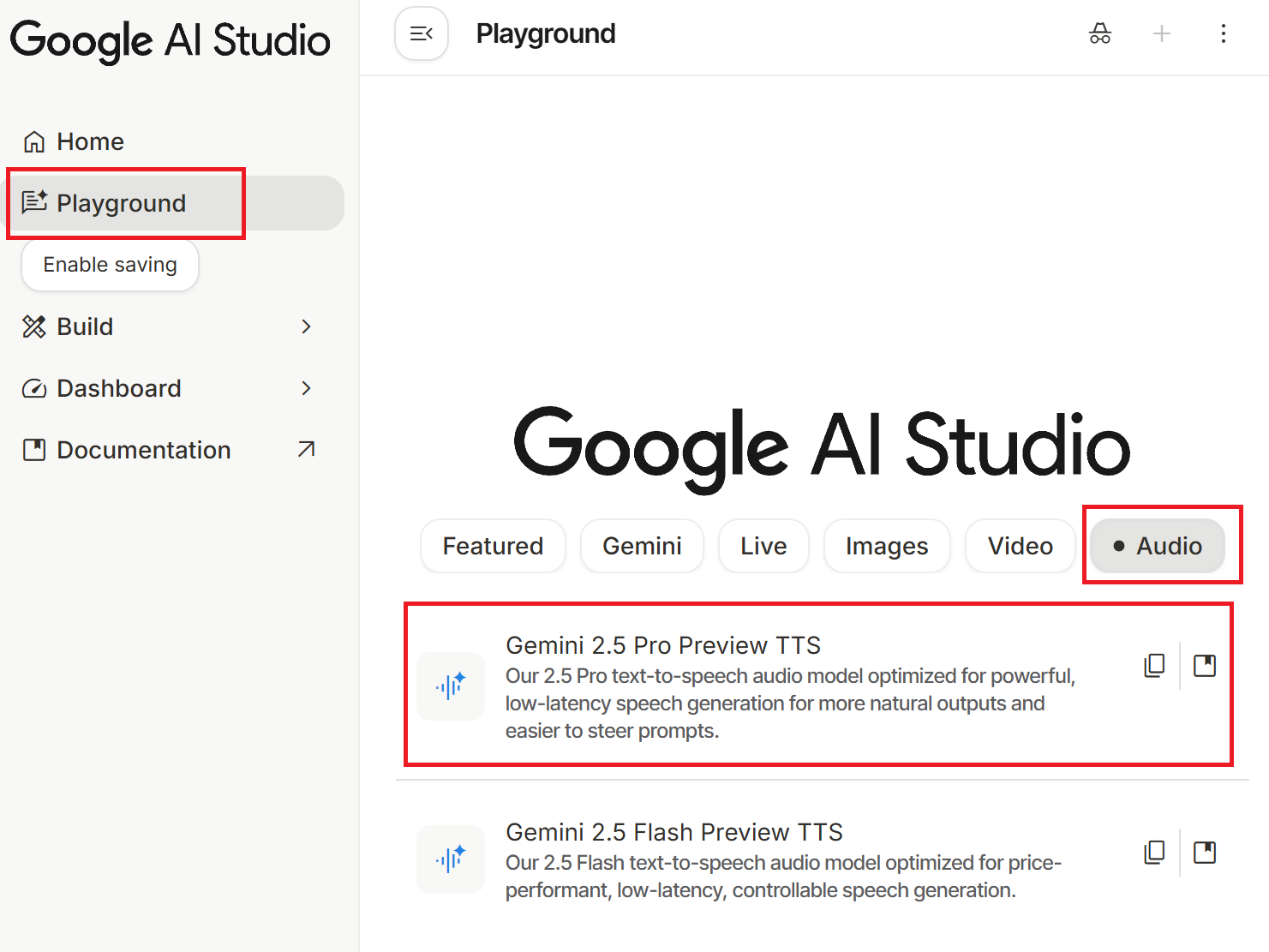
- Go to Google AI Studio, click "Playground," and select "Gemini 2.5 Pro Preview TTS" under the "Audio" category.
- Paste your script into the Text input box and select a Voice character.
- Click "Run Ctrl + ↵" to execute. After generation, click the three-dot icon (⋮) on the right to download the
.wavfile.
WARNING
If you generate a large amount of content in a short time, you may encounter the Failed to generate content: user has exceeded quota. Please try again later. error, which means your quota is exhausted; please try again later.
Parameter Settings and Troubleshooting
When to encounter this issue: When you want to optimize audio quality by adjusting parameters but find the output results unstable.
Temperature Parameter
- Function: Controls the randomness of audio generation, ranging from
0to2, with a default of1. - Troubleshooting: Testing shows that lowering the value (especially below
0.6or0.7) often causes the beginning of the audio to sound normal while the end suddenly goes silent or produces meaningless noise, and the tone is prone to sounding robotic. - Recommendation: Unless you have the patience to repeatedly test the limits, it is recommended to keep the default value of
1.
Script Content Optimization
- Mixed Chinese and English: Adding a half-width space between Chinese and English words helps the AI switch languages and pronounce them more accurately.
- Paragraph Pauses: Empty lines between paragraphs represent pauses, but do not use more than two consecutive empty lines, as this may cause the model to misjudge and end the audio prematurely.
- Duration Limit: The maximum length for a single generation is approximately 11 minutes. If the content length is close to the limit, try running it again, as the speaking speed varies slightly with each generation, potentially allowing for a complete output.
TIP
Due to the high proportion of Mainland Chinese terminology in the training data, the system often automatically replaces Taiwan-specific terms with Mainland terms (e.g., replacing "堆疊" with "堆棧"). There is currently no perfect solution; it is suggested to try inserting spaces between keywords, though results may vary.
Script Example
When to encounter this issue: When you need a reference for how to write Style instructions and scripts to achieve the best audio results.
Style instructions
Please use a vivid, enthusiastic, and natural conversational tone. Keep the Chinese intonation soft and friendly, and use a standard American accent for English.Text
歡迎收聽軟體工程師英語的第一集。今天我們的主題是 Git 版本控制。這是現代開發者每天賴以生存的工具。我們將從基礎指令到團隊協作的術語一一掃描。請放鬆心情,準備好你的耳朵,我們開始吧。

版本控制
Version Control
例句:Git is the most popular distributed version control system.
Git 是最受歡迎的分散式版本控制系統。

檔案庫
Repository
例句:Please clone the repository to your local machine.
請將檔案庫複製到你的本機。

初始化
Initialize
例句:Run git init to initialize a new repository here.
執行 git init 在這裡初始化一個新檔案庫。

Git 的指令雖然多,但只要掌握這 50 個最核心的動作,就能應對 90% 的工作場景。建議您反覆聆聽,特別是 Rebase 和 Merge 的區別。下一集,我們將進入 .NET 的開發世界。Conclusion
When to encounter this issue: When you need to evaluate whether AI Studio is suitable for your application scenario.
- Suitable Scenarios: Creating podcasts, audio content, or practicing presentations and performing scripts. AI Studio provides natural and expressive audio.
- Unsuitable Scenarios: Verbatim reading that requires complete fidelity to the original text (e.g., legal documents, technical specification documents). It is recommended to use traditional TTS tools instead.
Changelog
- 2025-12-25 Initial document created.